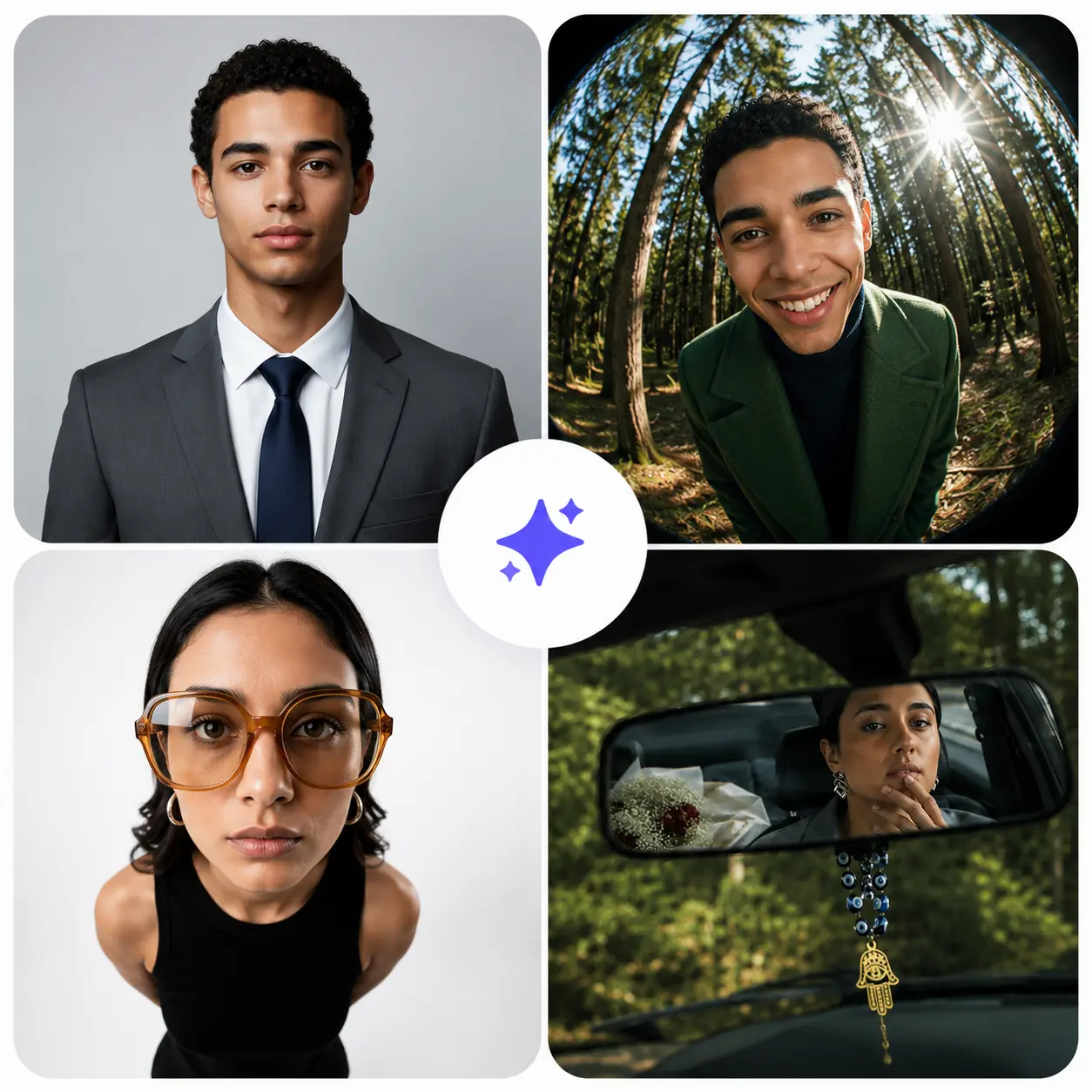
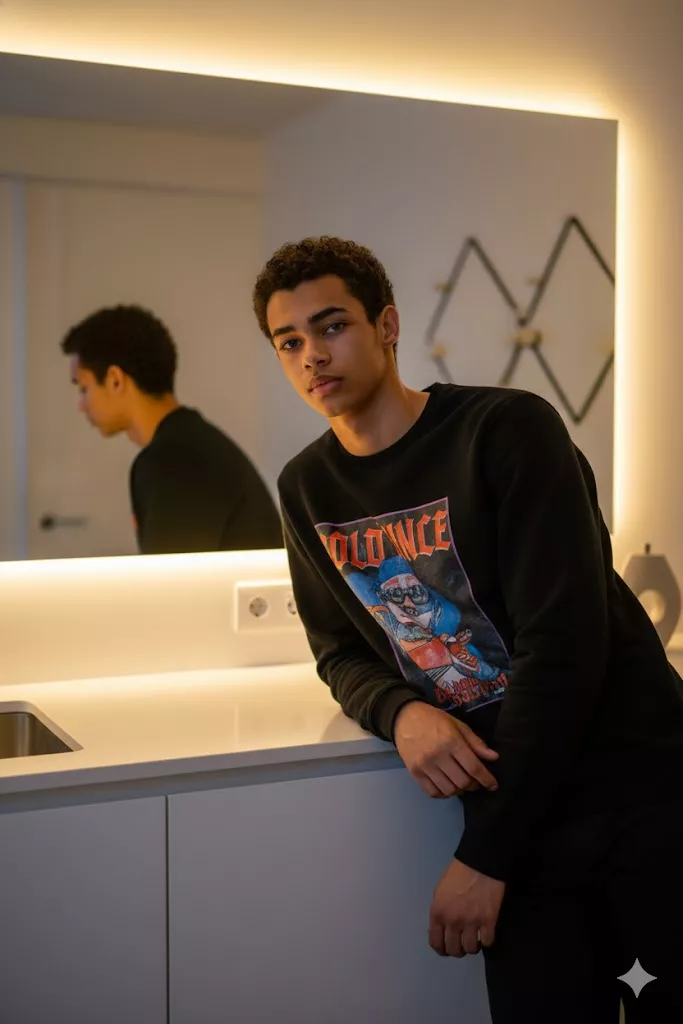
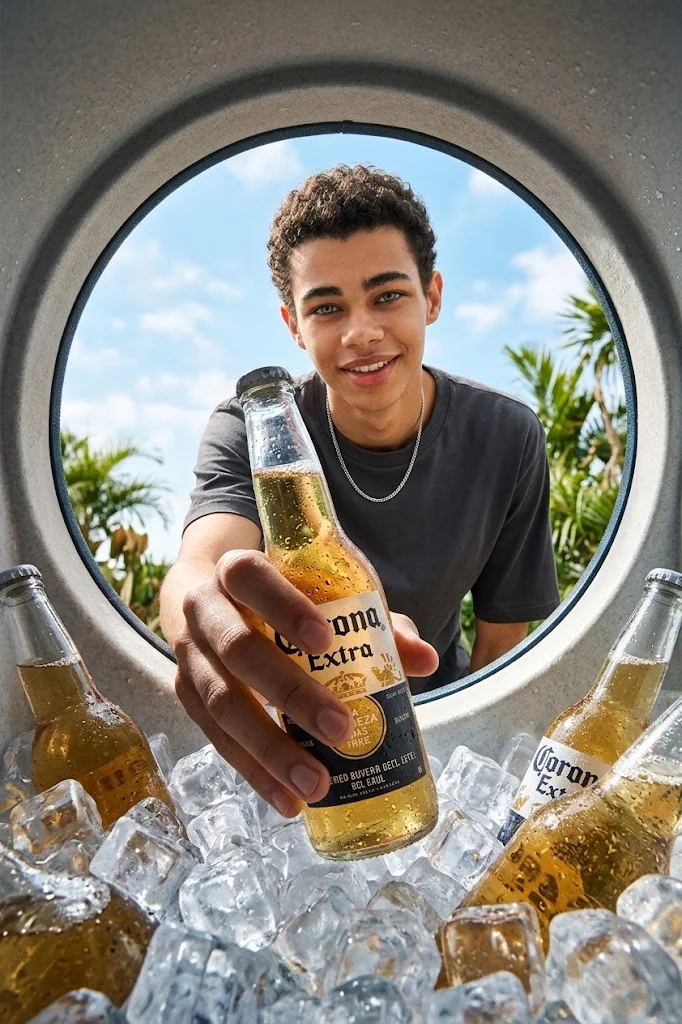
Ever typed a description into an art generator and ended up with something completely bizarre instead of the masterpiece you envisioned? The secret to bridging the gap between your imagination and the final artwork comes down to knowing how to use ai prompts effectively.
Put simply, ai prompts are the written instructions and details you give to an image generator telling it exactly what to create. They matter because artificial intelligence cannot read your mind; instead, it relies completely on your chosen words to determine the style, lighting, subject matter, and mood of the output. A clear instruction turns a frustrating, blurry mistake into stunning, precise visuals.
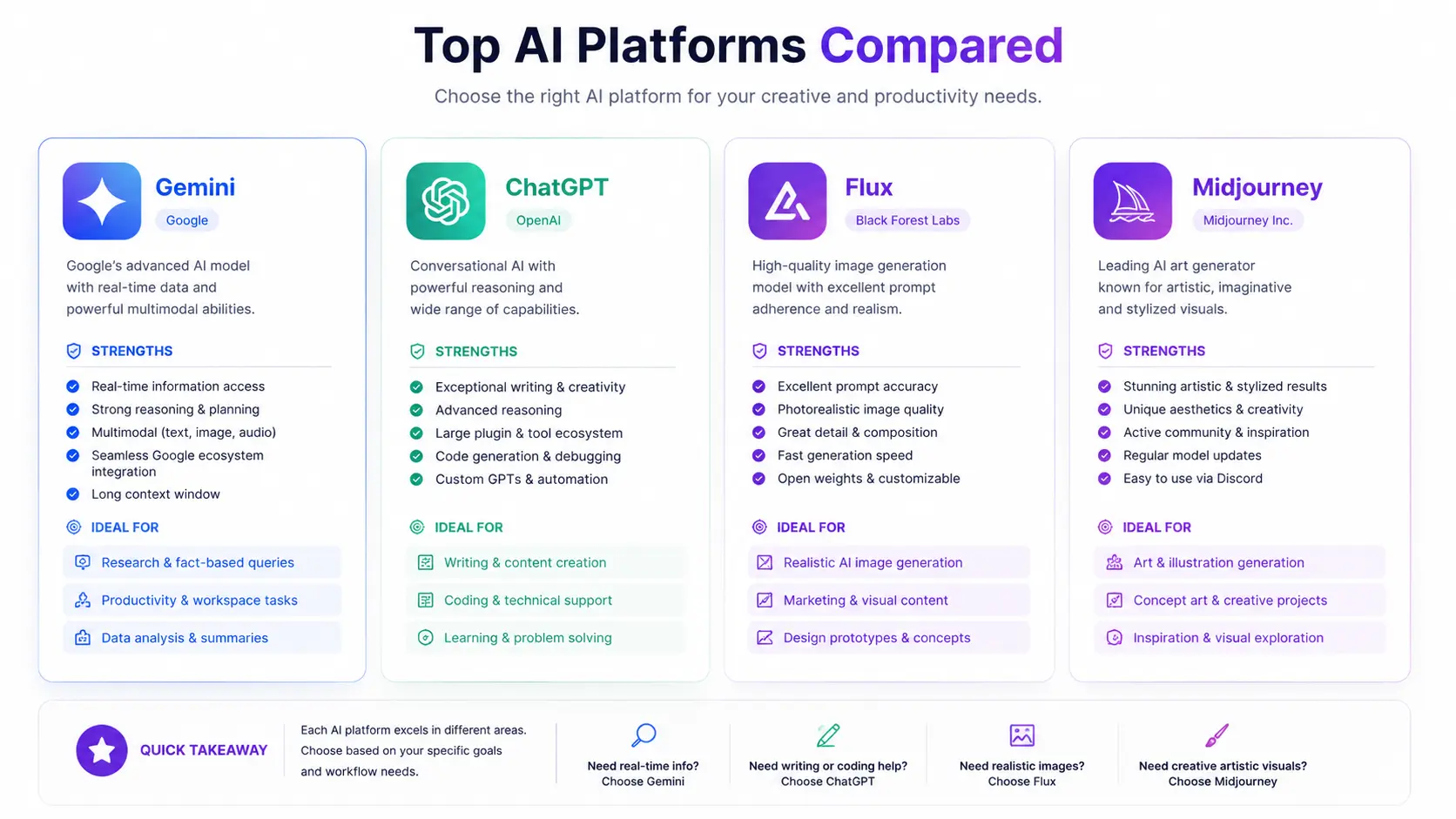
Whether you are experimenting with Gemini, ChatGPT, Flux, or Midjourney, mastering the art of writing compelling ai image prompts unlocks an entirely new level of creativity. You do not need to be a professional designer or a tech expert to get incredible results. By learning a few simple structuring techniques, you can guide any popular generator to paint the exact pictures from your mind. Let's explore how you can start crafting better descriptions today to elevate your digital artwork effortlessly.
When you first start creating digital art, understanding what are ai prompts is the most important stepping stone. Simply put, ai prompts are the text instructions you type into a creative tool to tell it what to draw. Think of them as giving directions to an enthusiastic digital artist who is ready to paint, but needs your specific guidance on every detail.
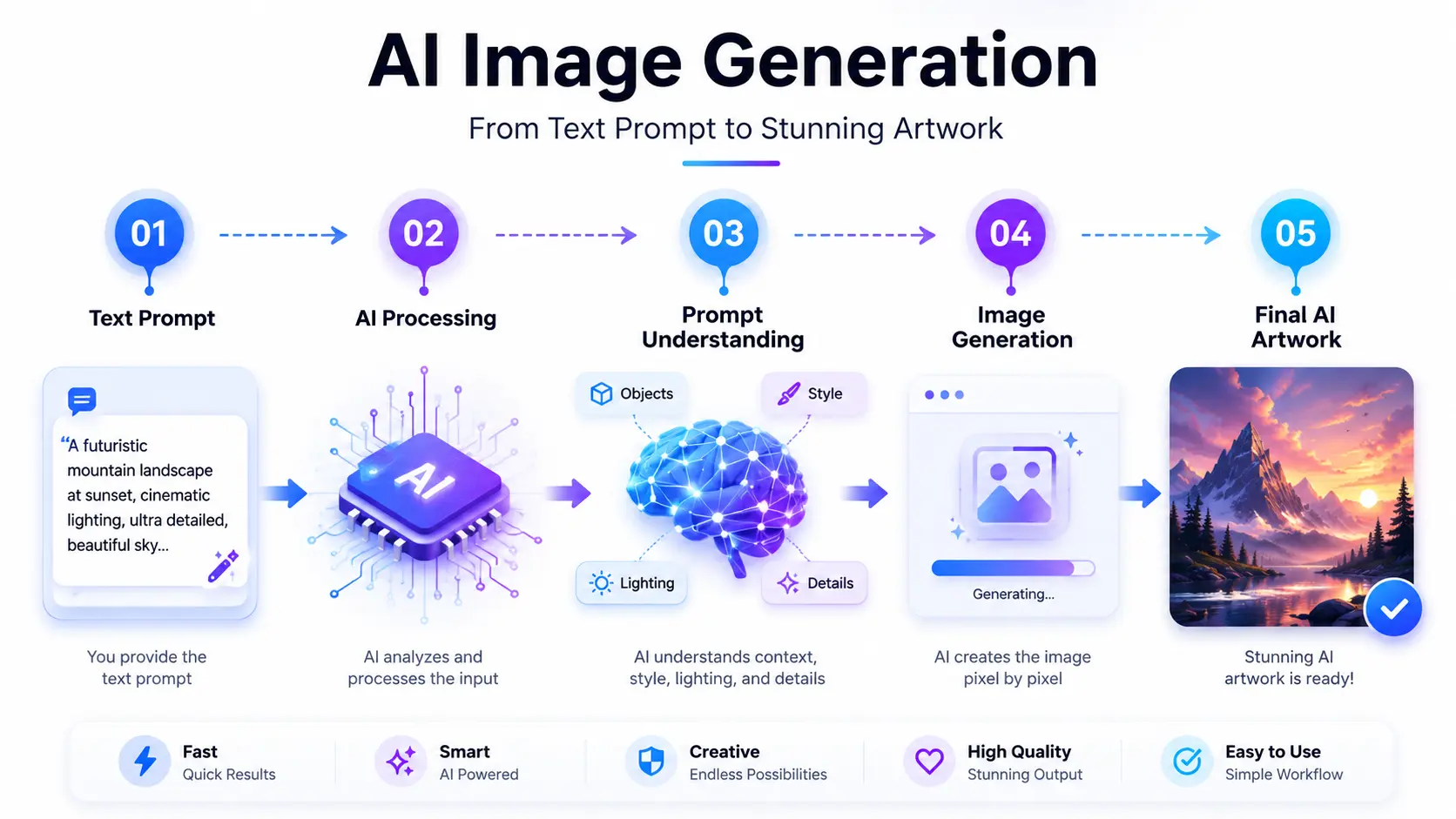
Behind the scenes, when you submit ai image prompts, the model does not actually "think" or understand concepts the way humans do. Instead, it translates your words into mathematical patterns, matching your vocabulary with millions of training images it has learned from.
This is why detailed image generation prompts always produce vastly superior results compared to short, basic ones. If you type just a single word like "dog," the generator has to guess everything else - the breed, the setting, the colors, and the mood - often resulting in a generic or messy picture. Adding depth gives the system a clear blueprint.
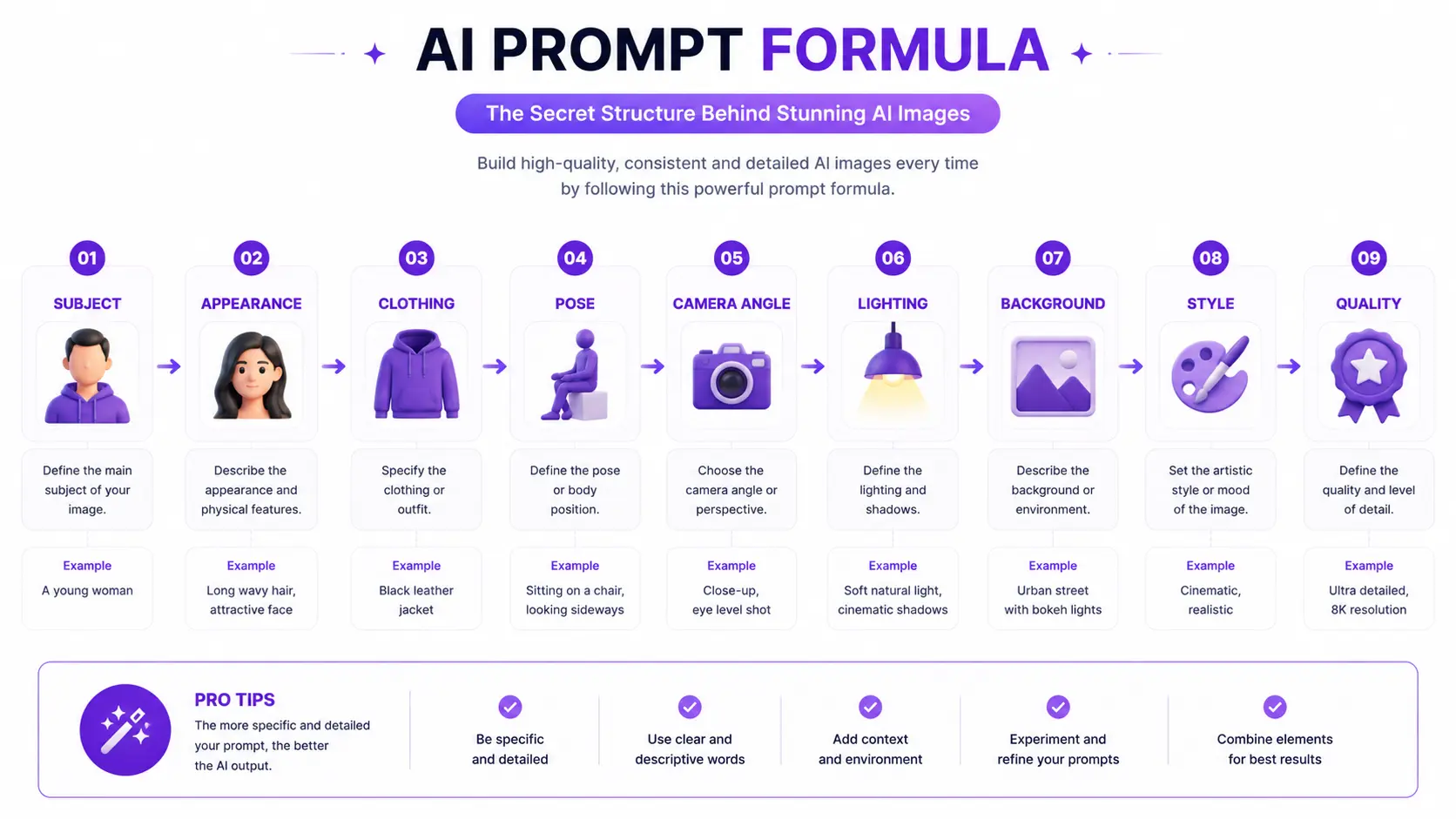
Every great instruction relies on several key building blocks. The subject is the main focus, while the style defines whether the artwork looks like an oil painting or a digital illustration. The lighting sets the time of day and mood, and the camera angle dictates your viewpoint, such as a dramatic low angle or intimate portrait photography. Meanwhile, the background provides context, the colors establish the emotional tone, and the composition arranges everything nicely within the frame. If you're looking for inspiration, you can explore our AI Camera Angle Prompts, Editorial Fashion Prompts, and Golden Hour Portrait Prompts to see how these elements work together in real AI-generated images.
Consider this simple ai prompt example:
Even small adjustments to lighting, camera angle, or style can significantly improve the final image quality.
Example Prompt
"A realistic portrait of a young man wearing a black leather jacket, cinematic golden hour lighting, shallow depth of field, blurred city street background, eye-level camera angle, ultra-detailed DSLR photography, natural skin texture."
This works brilliantly because it covers all the necessary bases without being overwhelmingly complicated. It gives the model a clear subject, specific lighting, a defined style, and a pleasant composition. Some AI models also support negative prompts, allowing you to tell the generator what should be avoided, resulting in cleaner and more accurate outputs.
Putting these ingredients together helps you move past random mistakes and start crafting a truly realistic image. Up next, let us take a closer look at how these instructions function behind the scenes.
2. How AI Prompts Work
Have you ever wondered what actually happens behind the screen when you type instructions into an ai art generator? Understanding how ai prompts work requires looking past the apparent magic of image generation and seeing how modern artificial intelligence processes human language. When you submit text, the system does not "think" or experience imagination like a person does. Instead, it translates your text into a vast mathematical map, matching your vocabulary with billions of visual concepts and patterns it learned during its extensive training phase.
The translation process begins the exact moment you submit your text. The software reads your instructions using a fundamental process known as tokenization. You can think of tokenization as cutting your sentences down into bite-sized pieces, root words, or syllable fragments that the underlying neural network can easily recognize and look up in its memory bank.
This is why the specific words you choose matter so deeply. Words build essential context, allowing the computer to understand how different elements interact with each other in the scene. For instance, the text binds your primary subject to your chosen artistic style, the mood-setting lighting, the perspective of the camera angle, and the balanced composition of the frame, ensuring everything looks cohesive rather than random.
Interestingly, prompt order also plays a massive role in shaping the final picture. Most models pay much closer attention to the words placed right at the beginning of your sentence than those placed at the very end. To gain even finer control over your creations, you can also use prompt weight-a basic setting that tells the AI to place extra emphasis or less attention on specific words. By mastering a logical prompt structure, you ensure the system distributes its creative focus correctly across every part of your description.
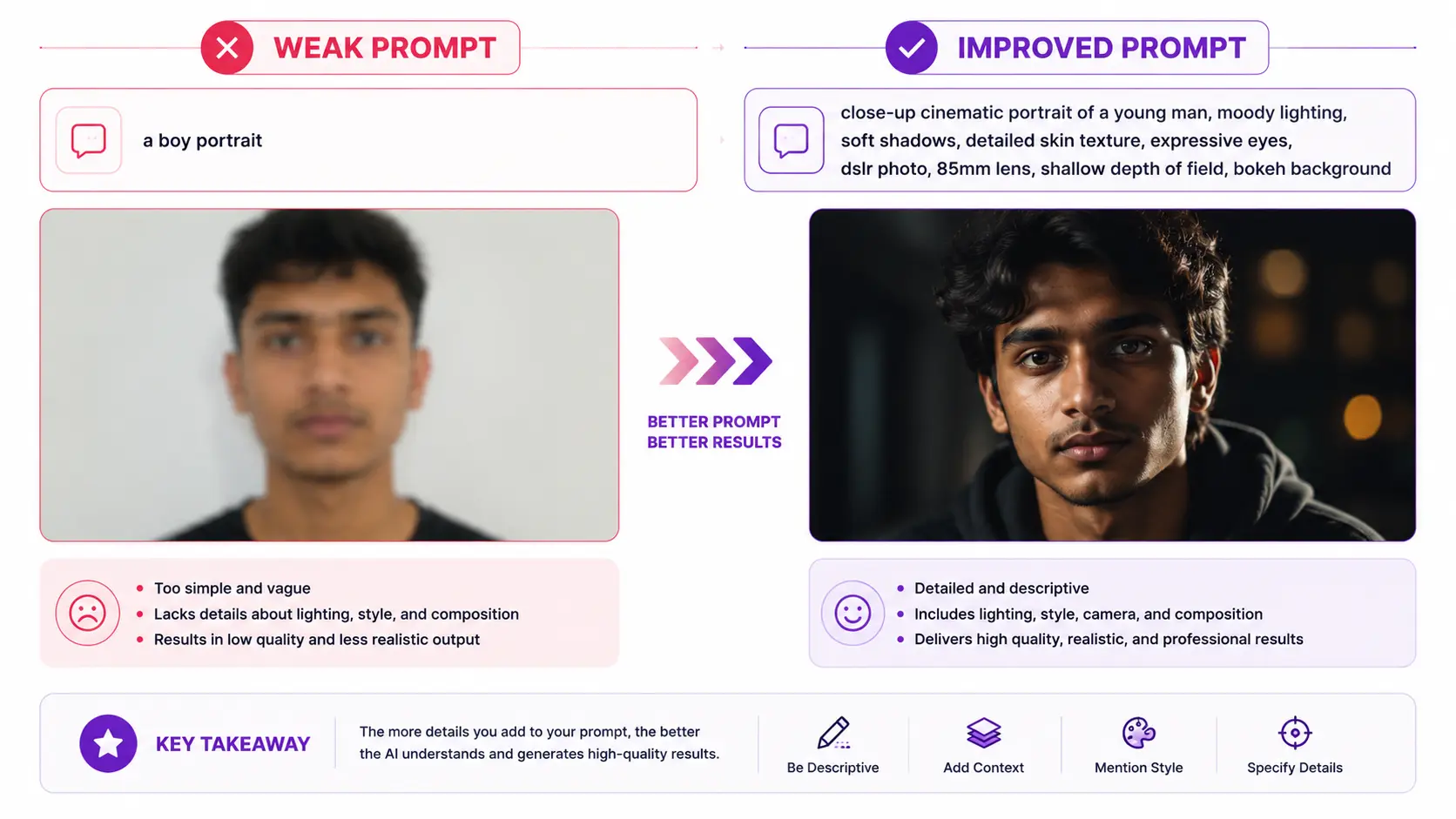
This explains why detailed ai prompts and ai image prompts consistently outperform short, vague inputs. If your text is too brief, the computer is forced to guess most of the visual details, often resulting in an unintended, generic, or messy image. Consider this clear comparison:
Prompt Strength
Example Input & Explanation
Weak Prompt
"A castle in the mountains." (The system has to guess the time of day, art style, weather conditions, and architectural era, often producing a generic and uninspiring result.)
Strong Prompt
"A majestic medieval stone castle perched on a snowy mountain peak, dramatic sunset lighting, epic cinematic composition, digital fantasy painting style." (Every detail gives the software clear boundaries, ensuring a stunning, highly tailored, and accurate output.)
Although different AI models such as Gemini, ChatGPT, Flux, and Midjourney interpret prompts in slightly different ways, they all rely on clear prompt structure, descriptive language, and contextual information to generate high-quality images.
For example, changing only the lighting from "daylight" to "golden hour lighting" or replacing "portrait" with "cinematic close-up portrait" can dramatically change the final image without rewriting the entire prompt.
Now that you understand the mechanics happening beneath the surface, you are ready to learn how to put these principles into practice. Now that you understand how AI interprets your instructions, it's time to learn the practical process of writing and using prompts effectively. In the next section, we'll walk through How to Use AI Prompts Step by Step.
Professional AI artists often generate multiple versions of the same prompt, making small adjustments each time until they achieve the desired result.
3. How to Use AI Prompts Step by Step
How to Use AI Prompts in 5 Simple Steps
Copy a high-quality AI prompt.
Choose the right AI model.
Paste the prompt into the AI image generator.
Generate the image.
Refine the prompt until you achieve the desired result.
Learning how to use ai prompts effectively transforms your creative workflow from a frustrating guessing game into a predictable and rewarding process. Whether you are using a new or familiar ai image generator, following a structured approach helps you unlock incredible results every single time. Here is how to master the process from start to finish.
Before you generate anything, you need a solid foundation. Copying a well-crafted set of ai prompts or ai image prompts gives you a reliable starting point to see how different descriptive words translate into visual elements.
Practical Advice
Keep a running notes document of your favorite prompt examples so you can easily copy and paste them whenever you want to test a new concept or style.
Real-World Example: You find a great formula online for a cyberpunk portrait and copy it to your clipboard to test in your generator of choice.
Common Mistakes to Avoid: Avoid copying long, bloated paragraphs full of random buzzwords. Stick to clean, descriptive sentences that clearly outline your vision.
Different platforms interpret instructions in unique ways. The exact same text will often produce wildly different results depending on whether you run it through Gemini, ChatGPT, Flux, or Midjourney, because each platform uses its own proprietary training data and rendering engine.
Practical Advice
Match your goal to the tool. For instance, some models excel at photorealism, while others specialize in artistic illustrations or strict text-adherence.
Real-World Example: Choosing Midjourney for hyper-detailed cinematic artwork, or using Flux for clean text rendering within an image.
Common Mistakes to Avoid: Do not expect identical outputs across different software. Always tweak your language slightly to suit the specific tendencies of the platform you choose.
Once you have selected your tool and copied your text, paste it directly into the input chat box or text field of the platform. This is where your instruction enters the system's tokenization pipeline.
Practical Advice
Double-check your spelling and grammar before hitting enter, as unexpected typos can occasionally confuse the text parser.
Real-World Example: Pasting your copied description into the generation box of your preferred ai image generator.
Common Mistakes to Avoid: Do not add extra random symbols or broken formatting that might disrupt how the software reads your text tokens.
4. Generate the Image
Hit the enter or generate button and let the model work its magic. During this phase, the artificial intelligence translates your text into a visual masterpiece.
Practical Advice
Be patient while the model renders, and use this time to observe how the system structures your text into visual layers.
Real-World Example: Clicking "Generate" and watching a blank screen transform into a realistic picture within seconds.
Common Mistakes to Avoid: Do not spam the generate button repeatedly while a task is still processing, as this can clutter your history and waste usage credits.
5. Refine and Improve the Prompt
Professional AI creators rarely achieve the perfect image on their first attempt. Instead, they gradually improve the prompt through several small refinements until the output matches their creative vision.
If your first output is close to what you wanted but not quite right, you should modify your text instead of generating a brand new concept from scratch. Strategic prompt editing saves time and helps lock down the exact look you want.
Practical Advice
Change only one or two variables at a time through careful prompt refinement so you can easily track what improved your image quality. Fine-tuning your lighting, shifting your camera angle, or adjusting your composition can completely transform a mediocre output into a stunning piece. Similarly, enriching your subject description by specifying unique clothing, a distinct facial expression, or a more immersive background adds incredible depth. Finally, shifting your artistic style from a generic drawing to specific portrait photography ensures the final visual matches your creative goals.
Real-World Example:
Original Prompt: "A woman standing in a city."
Improved Prompt: "A close-up portrait of a smiling woman in a vintage leather jacket, dramatic golden hour lighting, low-angle camera angle, blurred modern city street background, highly detailed realistic photo style."
Why the improved version produces better results: It replaces vague words with precise descriptive layers, giving the generator explicit instructions for mood, framing, and environment.
Common Mistakes to Avoid: Avoid changing every single word of your text at once when troubleshooting. If the result suddenly breaks, you won't know which specific change caused the error.
4. Best AI Models for AI Prompts
Now that you understand the complete workflow for creating better AI images, the next step is choosing the right AI model for your creative goals. Let's compare the most popular AI image generators and see where each one performs best.
AI Model
Best For
Difficulty
Gemini
Beginners, brainstorming, conversation
⭐ Easy
ChatGPT
Prompt writing & image generation
⭐ Easy
Flux
Photorealistic images & text accuracy
⭐⭐ Medium
Midjourney
Cinematic & artistic visuals
⭐⭐⭐ Advanced
When exploring the world of image generation, choosing the right system is just as crucial as learning how to write effective ai prompts. Different engines interpret human language through unique internal training architectures, meaning that finding the best ai models for your specific creative workflow makes a massive difference in final prompt quality.
Gemini is a conversational assistant built with robust multimedia capabilities, acting as a versatile ai image generator that integrates smoothly with natural everyday text.
Best Use Cases: Brainstorming visual concepts, drafting multi-step narrative content, and generating quick conceptual illustrations.
Strengths: Excellent conversational understanding, making it easy to dialogue back and forth to refine your initial concepts before rendering.
Limitations: Can sometimes produce overly sanitized outputs or struggle with hyper-specific positional instructions compared to specialized visual engines.
Who Should Use It? Beginners who want an all-in-one assistant to help write and test ai image prompts within a familiar conversational environment.
Practical Example
Asking the assistant to write a scene description for a cozy coffee shop and immediately generating the corresponding graphic layout in one window.
ChatGPT functions as a powerful conversational engine that pairs advanced language reasoning with integrated visual rendering tools to build distinct digital artwork.
Best Use Cases: Rapid prototyping, expanding short descriptions into rich scenes, and converting creative writing snippets into fully realized pictures.
Strengths: Exceptional command of narrative context and descriptive vocabulary, ensuring rich layouts and clear semantic structure.
Limitations: Occasionally leans heavily toward digital art styles unless forced toward realism through careful descriptive constraints.
Who Should Use It? Writers and content creators who prefer using an intelligent conversational partner to optimize their text before hitting generate.
Practical Example
Giving the model a basic story concept and asking it to expand the text into a detailed design blueprint for an illustration.
Flux is a modern, high-performance visual engine engineered specifically to deliver crisp structural details, accurate anatomy, and clean integrated typography.
Best Use Cases: Generating clean text elements within images, detailed hand structures, and complex multi-subject layouts.
Strengths: Exceptional textual adherence and remarkable accuracy when rendering human features or readable signs.
Limitations: Can occasionally require more precise syntactic structuring to avoid overly intense visual contrast.
Who Should Use It? Designers and creators who need absolute control over object positioning, legible words, and natural-looking human anatomy.
Practical Example
Crafting a vintage cafe storefront sign where the business name must appear spelled correctly on the glass window.
Midjourney is a specialized artistic powerhouse renowned for producing breathtaking, atmospheric visuals with incredible depth and striking aesthetic appeal.
Best Use Cases: High-end concept art, moody fantasy landscapes, and immersive cinematic scenes.
Strengths: Unmatched ability to render dramatic lighting, rich textures, and breathtaking photorealistic or painterly moods out of the box.
Limitations: Relies on specific parameter syntax and community interfaces that have a slightly steeper learning curve for absolute beginners.
Who Should Use It? Digital artists, photographers, and hobbyists who want gallery-quality results and professional-grade visual depth.
Practical Example
Generating a moody, rain-slicked cyberpunk street close-up featuring an intricate portrait of a traveler under neon lights.
Which AI Model Should You Choose?
If you're a beginnerGemini
If you're creating realistic portraitsFlux
If you're writing prompts and generating images in one placeChatGPT
If you're focused on cinematic artworkMidjourney
No AI model produces perfect results every time. The quality of the final image depends not only on the model you choose but also on how well your prompt is written and refined.
Now that you know which AI model best suits your creative needs, the next step is learning how to write prompts that consistently generate high-quality images.
5. How to Write Better AI Prompts
Quick Formula for Writing Better AI Prompts
Start with the main subject.
Add visual details.
Describe the lighting.
Choose the camera angle.
Define the background.
Specify the art style.
Add negative prompts (if supported).
Test and refine your prompt.
Mastering how to write ai prompts turns a frustrating guessing game into an enjoyable, creative process. While prompt engineering might sound complex, learning basic prompt writing allows anyone to build consistent visual assets from scratch. Applying structured habits to your daily workflow helps you craft effective ai prompts and ai image prompts every single time. Here is a step-by-step breakdown using proven ai prompt examples.
1. Start with the Main Subject
Why it matters: The subject anchors your entire image. Without a clear focal point, the generator randomly blends multiple ideas, resulting in a confused picture.
Practical Advice: Always place your core subject right at the front of your sentence so the model gives it primary focus.
Real-World Example: "A majestic golden retriever puppy sitting proudly."
Common Mistake to Avoid: Starting with vague words like "a beautiful scene" instead of naming the exact entity you want.
2. Add Visual Details
Why it matters: Specific details bring a flat concept to life, adding texture, clothing, and expression to your visual.
Practical Advice: Use descriptive adjectives regarding textures, colors, and expressions rather than generic buzzwords.
Real-World Example: "Wearing a tiny blue denim jacket and a joyful expression."
Common Mistake to Avoid: Overloading the sentence with conflicting adjectives that confuse the rendering engine.
3. Describe the Lighting
Why it matters: Lighting dictates the overall mood, emotional tone, and realism of your final artwork.
Practical Advice: Mention time-of-day lighting or specific setups like soft studio lights to guide the atmosphere.
Real-World Example: "Soft golden hour sunlight filtering through tall pine trees."
Common Mistake to Avoid: Leaving lighting entirely up to chance, which often produces flat, uninspired shadows.
Why it matters: Stating your preferred aesthetic ensures your output matches your vision, whether you want realistic photography or a painted look.
Practical Advice: Mention clear mediums, such as digital illustration, oil painting, or professional portrait photography.
Real-World Example: "Professional portrait photography with cinematic color grading."
Common Mistake to Avoid: Mixing conflicting styles, like asking for a vintage oil painting and a 3D render simultaneously.
7. Use Post-Processing and Negative Prompts (When Supported)
Why it matters: Negative prompts tell the generator what elements to actively avoid, cleaning up unwanted artifacts.
Practical Advice: List common flaws like blurry edges or extra limbs in your negative box if your platform supports it.
Real-World Example (Negative prompt): "Blurry, deformed, extra paws, low resolution."
Common Mistake to Avoid: Writing overly long negative instructions that restrict the model's creative freedom.
8. Test and Refine Your Prompt
Why it matters: Initial outputs rarely match perfection on the first try; iterative testing ensures steady improvement.
Practical Advice: Change one single descriptive word at a time to track how it alters the final visual quality.
Real-World Example: Adjusting the lighting descriptor from noon sun to moody twilight to check the atmosphere.
Common Mistake to Avoid: Rewriting your entire sentence from scratch after a single minor error.
To pull everything together, you can use this reliable formula for consistent results:
Prompt Element
Example
Subject
Young woman
Appearance
Long curly hair
Clothing
White linen dress
Pose
Walking
Camera Angle
Eye-level
Lighting
Golden hour
Background
Beach
Style
Cinematic photography
Quality
Ultra realistic, 8K
Here is a fully written prompt using this exact formula:
Complete Formula Example
"A curious red fox cub → fluffy orange fur and bright amber eyes → wearing a tiny knitted red scarf → sitting alert on a mossy log → close-up eye-level camera angle → warm morning golden hour lighting casting soft rays → misty ancient forest background with rich green ferns → professional wildlife portrait photography style → sharp focus, high visual depth of field, stunning cinematic color grading, highly detailed texture."
Now that you have mastered writing effective instructions, let us look at some common pitfalls to avoid.
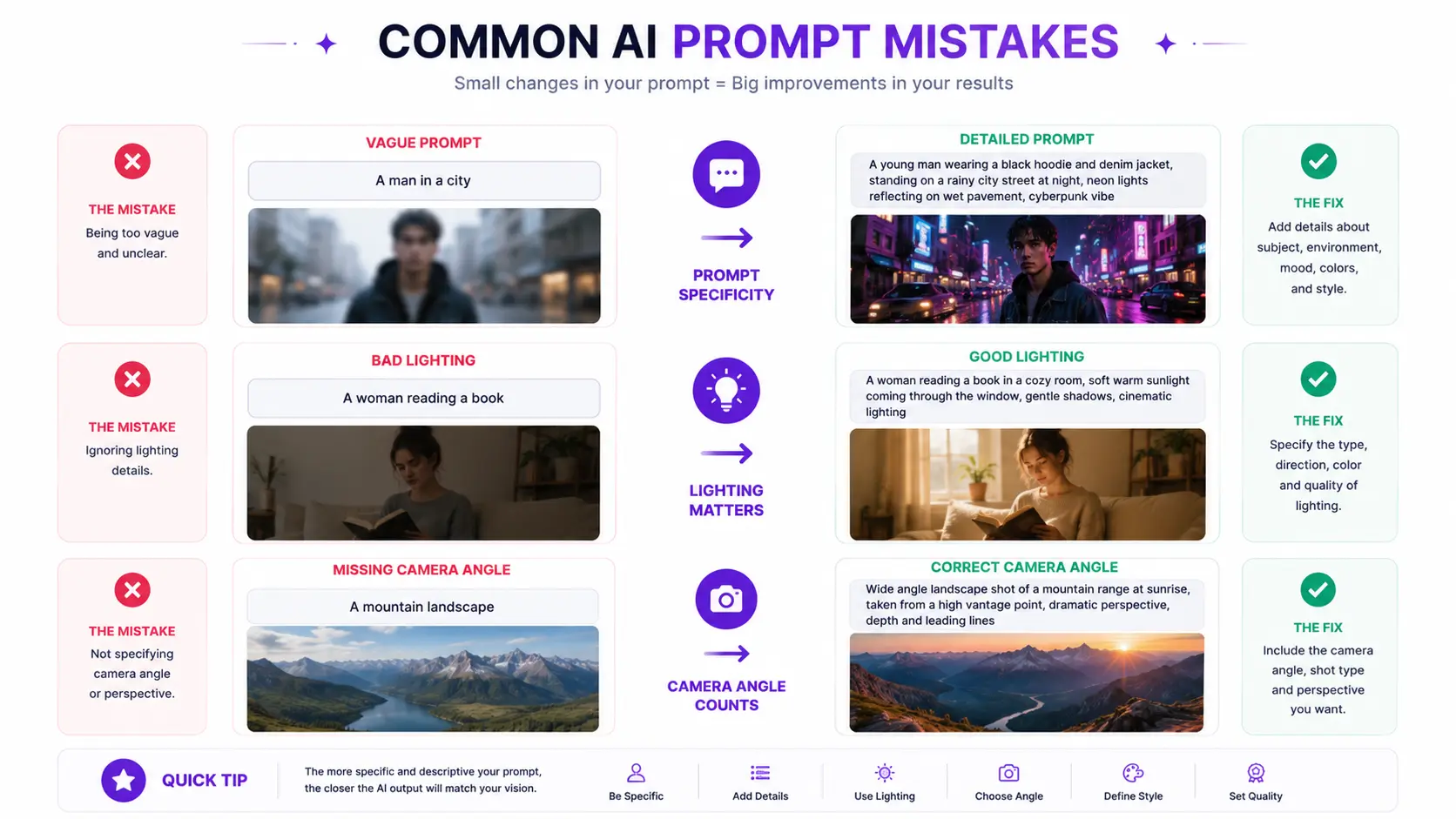
6. Common AI Prompt Mistakes
Even when you understand the basic rules of image generation, it is easy to slip into bad habits that ruin your output. Recognizing common ai prompt mistakes helps you save time, avoid frustration, and fix errors before wasting credits. Let us examine the most frequent prompt writing mistakes and learn how to correct them using practical ai prompt examples and cleaner ai prompts.
1. Writing Vague Prompts
Why it is a mistake: Beginners often write overly brief text because they assume the software reads minds, leaving the system to guess essential elements.
Practical Advice: Always anchor your sentence with a specific subject and descriptive modifiers.
Prompt Type
Example
Bad prompt
"A cool car."
Improved prompt
"A classic vintage red convertible sports car parked on a coastal highway."
Common beginner mistake: Relying on one or two words and hoping for a masterpiece.
Quick Pro Tip
If your result looks generic, add three descriptive adjectives about color, texture, and setting.
2. Adding Too Many Unrelated Details
Why it is a mistake: Cramming too many conflicting concepts into a single instruction confuses the neural network, creating a messy visual soup.
Practical Advice: Keep your focus narrow and ensure every added detail supports the main narrative.
Prompt Type
Example
Bad prompt
"A futuristic robot eating pizza on a medieval castle roof during a snowstorm in a tropical jungle."
Improved prompt
"A sleek futuristic robot sitting quietly on a sleek rooftop garden under a starry night sky."
Common beginner mistake: Trying to tell an entire epic movie story in one sentence.
Quick Pro Tip
Follow the rule of one primary focus per scene to maintain a clean composition.
3. Ignoring Lighting and Camera Angles
Why it is a mistake: Leaving out environmental controls results in flat, dull pictures that look like unedited snapshots.
Practical Advice: Explicitly state your preferred lighting and camera angle to establish depth and mood.
Prompt Type
Example
Bad prompt
"A portrait of a woman."
Improved prompt
"A close-up portrait of a woman with dramatic golden hour lighting and a low-angle camera angle."
Common beginner mistake: Forgetting that virtual cameras need direction just like real physical ones.
Quick Pro Tip
Use words like cinematic lighting or rim lighting to instantly upgrade flat shadows.
4. Mixing Multiple Art Styles
Why it is a mistake: Combining conflicting aesthetic mediums (like oil painting and 3D render) creates visual confusion and muddy textures.
Practical Advice: Stick to one unified style descriptor per generation.
Prompt Type
Example
Bad prompt
"A cartoon anime watercolor sketch that looks like a hyper-realistic photo."
Improved prompt
"A clean digital art illustration with smooth watercolor textures and soft pastel colors."
Common beginner mistake: Throwing every popular art buzzword into the input box at once.
Quick Pro Tip
Choose between a realistic photo look or a stylized illustration before you start typing.
5. Expecting Perfect Results on the First Try
Why it is a mistake: Believing that top-tier ai image prompts always deliver perfection immediately leads to quick burnout.
Practical Advice: Treat generation as an iterative canvas where the first output is simply your initial draft.
Prompt Type
Example
Bad prompt
"An astronaut on Mars." (Expects absolute perfection instantly without adjustments).
Improved prompt
"An astronaut walking across red rocky dunes on Mars, dust kicked up around boots, sharp focus." (Iterated after a blurry first test).
Common beginner mistake: Deleting the entire workspace in frustration after one imperfect render.
Quick Pro Tip
Expect to run at least two or three test generations to dial in your vision.
6. Forgetting Negative Prompts
Why it is a mistake: Omitting exclusion terms allows common generation flaws like blurry lines or distorted hands to ruin the asset.
Practical Advice: Use negative prompts to tell the model what to banish from the frame.
Prompt Type
Example
Bad prompt
"A crowded city street." (Leaves room for messy distortions).
Improved prompt
Positive: "A busy neon-lit city street at night." / Negative: "Blurry, deformed, extra limbs, low resolution."
Common beginner mistake: Assuming the generator knows what flaws you dislike.
Quick Pro Tip
Keep a standard list of negative keywords saved to copy-paste into every new session.
7. Using Unrealistic Expectations
Why it is a mistake: Expecting software to render complex text physics or impossible paradoxes leads to broken images.
Practical Advice: Keep your physical descriptions grounded in logic that an artist could realistically draw.
Prompt Type
Example
Bad prompt
"A transparent glass cat made of liquid fire floating upside down in zero gravity."
Improved prompt
"A sleek orange glass cat figurine glowing softly from internal amber lights on a dark table."
Common beginner mistake: Testing overly abstract riddles instead of visual descriptions.
Quick Pro Tip
Ask yourself if a human painter could visualize the scene before typing it out.
8. Not Testing Different Prompt Variations
Why it is a mistake: Sticking stubbornly to one phrasing variant prevents you from discovering how slight wording shifts improve quality.
Practical Advice: Perform careful prompt refinement by swapping out verbs and nouns one at a time.
Prompt Type
Example
Bad prompt
Using the exact same stale sentence structure for every single project.
Improved prompt
Testing synonym variations like swapping "bright sun" for "harsh midday glare" to observe the difference.
Common beginner mistake: Refusing to tweak vocabulary when an output feels slightly off.
Quick Pro Tip
Save three variations of your favorite descriptions to see which one yields the cleanest details.
Avoiding these common mistakes will significantly improve your results, but great AI images also depend on a few advanced techniques. In the next section, you'll discover practical tips that experienced creators use to produce more realistic, cinematic, and professional-looking images.
7. Pro Tips for Better AI Images
Moving from an average beginner to a skilled creator requires adopting insider habits that elevate your work. Applying smart ai image tips transforms random experiments into consistent masterpieces. Experienced creators rely on structured techniques to boost overall ai image quality and craft stunningly realistic ai images. Mastering these habits ensures every generation comes closer to your exact vision.
1. Use Reference Images for Inspiration
Why it matters: Visual references give you a clear baseline for textures, mood, and composition before you write a single word.
Practical Advice: Look at professional art or real photography to understand how light and shadows behave in specific settings.
Real-World Example: Reviewing vintage magazine covers before writing text for a retro portrait.
Common Mistake: Trying to invent a complex scene entirely from your head without any visual reference.
Pro Tip
Collect mood boards to quickly identify the exact descriptors you need.
2. Generate Multiple Variations
Why it matters: AI models introduce a degree of randomness, meaning the first result is rarely the absolute best option.
Practical Advice: Always run at least four variations of your base text to compare different layouts and expressions.
Real-World Example: Running a batch of four landscape options to pick the one with the best cloud formations.
Common Mistake: Accepting a mediocre first generation and assuming the tool cannot do better.
Pro Tip
Use batch generation features to save time when exploring new concepts.
3. Experiment with Different Camera Angles
Why it matters: Shifting your perspective alters the emotional impact and drama of the entire output.
Practical Advice: Swap standard eye-level views for dramatic low angles or bird-eye perspectives.
Real-World Example: Changing a character shot from eye-level to a low camera angle to make the subject look heroic.
Common Mistake: Leaving framing decisions completely blank for every single project.
Pro Tip
Match your camera angle to the intended mood of your story.
4. Control Lighting and Color Grading
Why it matters: Proper lighting and professional color grading separate amateur digital art from high-end cinematic renders.
Practical Advice: Specify exact light sources like neon glows, soft window light, or golden hour rays alongside your preferred palette.
Real-World Example: Adding "teal and orange color grading with dramatic side lighting" to a cyberpunk street scene.
Common Mistake: Relying on default ambient lighting which often results in flat shadows.
Pro Tip
Study professional film stills to discover effective lighting vocabulary.
5. Keep Prompts Clear and Focused
Why it matters: Overly cluttered sentences confuse the rendering engine and dilute your main subject.
Practical Advice: Focus on concise, high-impact descriptors rather than writing long paragraphs of fluff.
Real-World Example: Trimming a cluttered fifty-word sentence down to twenty precise descriptive tokens.
Common Mistake: Stacking conflicting adjectives that pull the software in opposite directions.
Pro Tip
Prioritize clarity over length during prompt optimization.
6. Save and Organize Your Best Prompts
Why it matters: Building a personal prompt library saves hours of trial and error when you want to replicate successful styles.
Practical Advice: Keep a dedicated notes document or spreadsheet categorized by genre, mood, and model.
Real-World Example: Saving a tested formula for photorealistic textures to use in future projects.
Common Mistake: Losing track of successful text formulas in endless chat history logs.
Pro Tip
Tag your favorite entries with keywords for instant searching.
7. Learn from Every Generation
Why it matters: Analyzing why an image failed teaches you how the model interprets specific vocabulary.
Practical Advice: Keep a log of unexpected glitches and note which words caused them so you can avoid them next time.
Real-World Example: Noticing that the word "giant" distorted the composition, and replacing it with "towering."
Common Mistake: Getting angry at the generator instead of diagnosing the linguistic cause.
Pro Tip
Treat every failed render as a helpful lesson in machine logic.
8. Stay Updated with New AI Features
Why it matters: Generative technology evolves rapidly, and new tools frequently introduce better ways to maintain image consistency.
Practical Advice: Check update logs for your preferred platforms to learn about newly released rendering parameters.
Real-World Example: Adopting new style-reference parameters as soon as they roll out to stabilize character output.
Common Mistake: Using outdated phrasing habits long after platforms have upgraded their underlying engines.
Pro Tip
Test new features on old text formulas to see how performance improves.
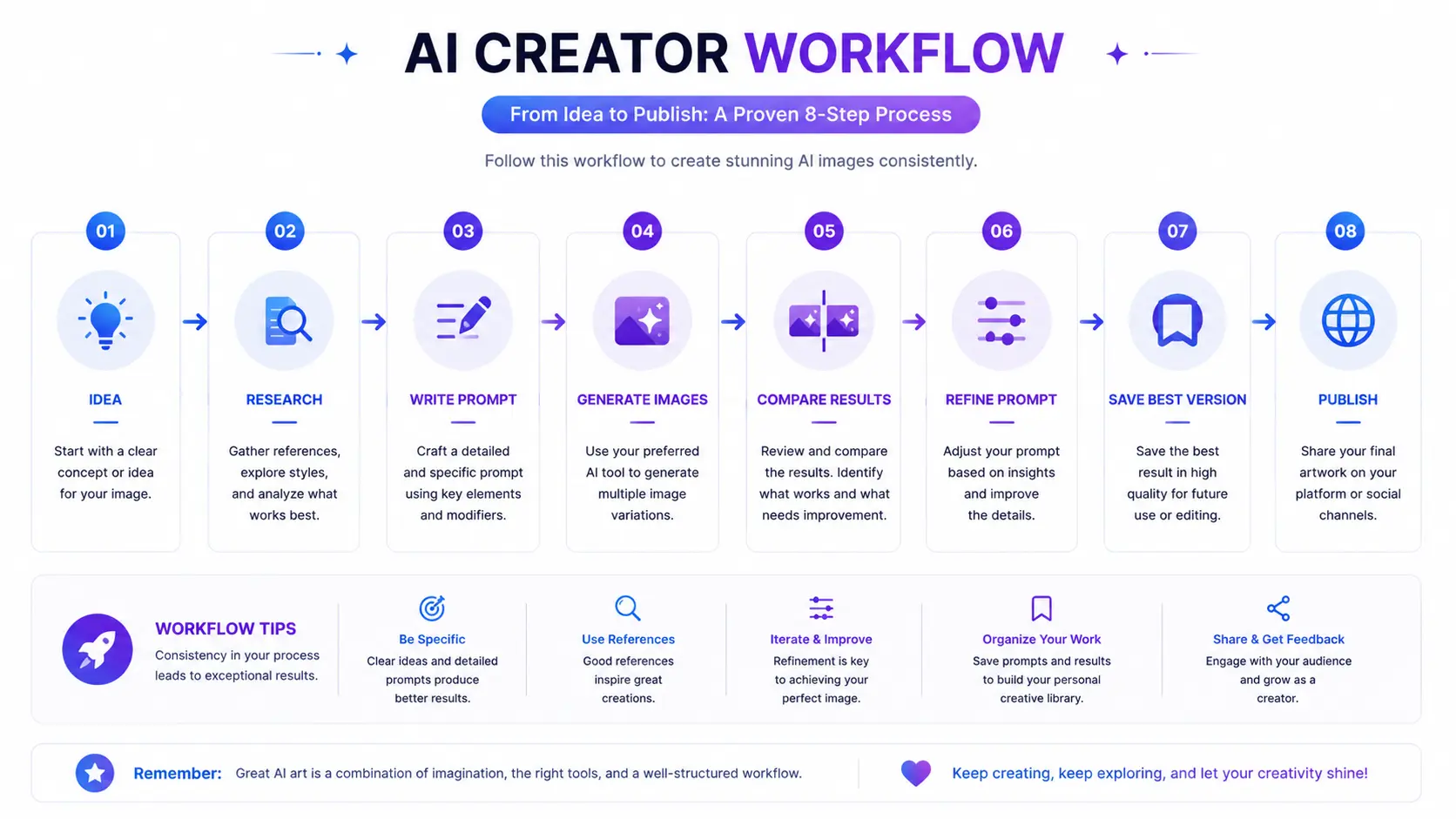
Professional AI Creator Workflow
To keep your creative process smooth and repeatable, follow this step-by-step professional workflow:
Idea → Research → Write Prompt → Generate Images → Compare Variations → Refine Prompt → Save Best Version → Organize Prompt Library → Publish
✔ Subject
✔ Lighting
✔ Camera Angle
✔ Background
✔ Style
✔ Composition
✔ Negative Prompt
✔ Generate Multiple Versions
✔ Save Best Prompt
By following these habits consistently, you'll spend less time fixing mistakes and more time creating high-quality AI images. Before we finish, let's answer some of the most common questions beginners ask about AI prompts in the FAQ section.
8. Frequently Asked Questions
1. What are AI prompts?
AI prompts are written instructions that you provide to a software tool to guide its output. In digital art creation, these textual descriptions tell the system what subjects, colors, and styles to render into a final graphic. Think of them as giving clear directions to a virtual assistant who needs your specific guidance to visualize an idea accurately.
2. How do AI prompts work?
AI prompts work by translating human language into numerical values that a neural network can process. When you submit text, the system splits your sentences into smaller fragments through tokenization and matches those tokens with patterns learned during its training.
3. Which AI model is best for image prompts?
The best model depends heavily on your specific creative goals and personal preferences. Platforms like Gemini and ChatGPT excel at conversational planning and expanding simple ideas, while specialized engines like Flux and Midjourney are renowned for rendering exceptional photorealistic textures.
4. Why are my AI images not matching my prompt?
Images often fail to match text descriptions due to ambiguous phrasing, conflicting adjectives, or leaving out crucial foundational elements like lighting and style. Fixing this requires swapping out generic terms for precise descriptions.
5. How can I write better AI prompts?
Writing better instructions involves structuring your text logically by starting with a clear subject, followed by visual details, lighting specifications, and artistic medium. Testing single-variable adjustments helps improve your results significantly.
6. What are negative prompts?
Negative prompts are secondary instructions used to tell an AI generator what elements you want to exclude from the final visual output, helping banish common flaws such as blurry edges or distorted anatomy.
7. Can I use the same prompt in Gemini, ChatGPT, Flux, and Midjourney?
You can use the exact same text across different platforms, but you will often get noticeably different visual results because each software runs on a unique internal training architecture.
8. Do longer AI prompts always produce better images?
Longer text inputs do not automatically guarantee superior pictures; overly bloated sentences often confuse the rendering engine. Clarity and conciseness are the real keys to success.
9. How many times should I refine a prompt?
Most creators iterate three to five times per project. Refinement should continue as long as you are seeing steady progress toward your vision.
10. Where can I find ready-to-use AI prompts?
You can discover ready-to-use formulas across dedicated creator communities, digital art forums, and online prompt libraries to study how experienced artists structure their vocabulary.
Mastering the art of writing effective instructions takes time, patience, and a willingness to experiment. Every failed render is simply a valuable lesson in how machine logic interprets human language.